Feed Your
NotebookLM
Ingest entire websites, bulk URLs, and documentation directly into Google NotebookLM in seconds.
Bulk URL Import
Paste a list of 100+ URLs and let NoteFeeder handle the ingestion. Efficient and fast.
Full Site Crawl
Detects all links on the current page and recursively feeds them into your notebook.
Auto-Ingest
Seamlessly ingests full HTML pages and YouTube transcripts directly into your notebook.
Visual Tour
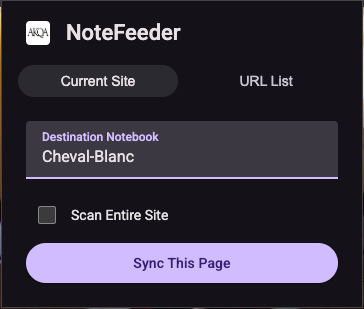
1. Select your destination Notebook
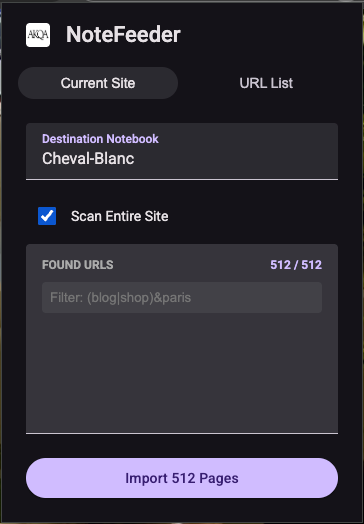
2. Choose to scan the entire site
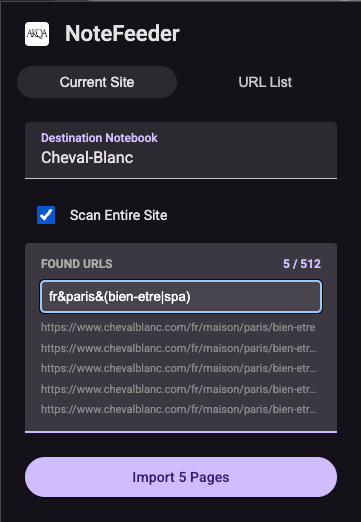
3. Powerfully filter URLs before importing
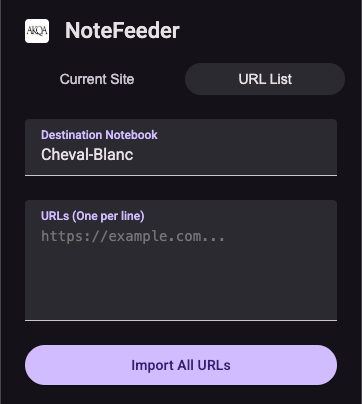
4. Or paste a list of URLs directly
Advanced Filtering
Refine your crawls with powerful boolean logic operators.
paris&restaurant
Matches URLs containing both "paris" and "restaurant".
blog|news
Matches URLs containing either "blog" or "news".
(api|docs)&v2
Complex groups: matches "v2" plus either "api" or "docs".
Note for AKQA users
Corporate Google accounts are currently limited to 300
sources per notebook. We strongly recommend using filters to strictly silo your content and crawl
only what matters.
3-Step Installation
Open Extensions
Go to chrome://extensions and toggle Developer mode.
Load Unpacked
Click "Load unpacked" and select the dist folder.
Support & Bugs
Found a bug? Send us an email with the details.